Posts

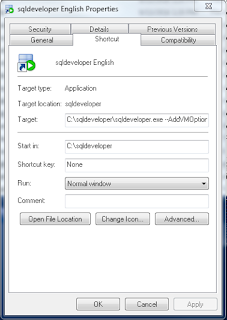
How to change SQLDeveloper language

Image
Create a direct access and add --AddVMOption=-Duser.language=en as a parameter. For example: C:\sqldeveloper\sqldeveloper.exe --AddVMOption=-Duser.language=en

Manage Windows Registry from JAVA

import java.lang.reflect.InvocationTargetException; import java.lang.reflect.Method; import java.util.HashMap; import java.util.Map; import java.util.ArrayList; import java.util.List; import java.util.prefs.Preferences; public class WinRegistry {   // inspired by   // http://javabyexample.wisdomplug.com/java-concepts/34-core-java/62-java-registry-wrapper.html   // http://www.snipcode.org/java/1-java/23-java-class-for-accessing-reading-and-writing-from-windows-registry.html   // http://snipplr.com/view/6620/accessing-windows-registry-in-java/   public static final int HKEY_CURRENT_USER = 0x80000001;   public static final int HKEY_LOCAL_MACHINE = 0x80000002;   public static final int REG_SUCCESS = 0;   public static final int REG_NOTFOUND = 2;   public static final int REG_ACCESSDENIED = 5;   private static final int KEY_ALL_ACCESS = 0xf003f;   private static final int KEY_READ = 0x20019;   private static Pre...

Read Windows Registry from JAVA

// Gets value from property, if it does not exist, gets it     // from Windows registry     private String getValueFromPropertyOrLocalMachineRegistry(Properties props,             String propname, String registryPath, String registrykey) {         String value = props.getProperty(propname);         if ((value == null) || (value.trim().isEmpty())) {             try {                 value = WinRegistry.readString(                         WinRegistry.HKEY_LOCAL_MACHINE,                         registryPath,                         registrykey);             } catch (Exception ex) {         ...

JAVA JPA WITH HIBERNATE AND H2 Tutorial

Image
JAVA JPA WITH HIBERNATE AND H2 Tutorial Setting the environment: Download and install H2 Database http://www.h2database.com/html/download.html Create a connection to the database, in my case I am using Netbeans. Creation of a new Database Connection can be done from the Services Tab, Databases node: Have in mind that it is not possible to test the connection before the JDBC URL has been written into. Select the PUBLIC schema when asked. And put a name onto it, I decided to name it as "Hibernate 101 on H2" Download Hibernate http://sourceforge.net/projects/hibernate/files/hibernate3/ JPA with Hibernate: For the shake of portability and standarization we will be using JPA. Natively speaking, Hibernate relies onto a context configuration file -  hibernate.cfg -  and a single or many persistence configuration files  - hibernate.hbm.xml - .  On the other hand JPA configuration is based on just one file:  persistence.xml.  ...

A Wonderfully Integrated Native Object Oriented Neural Network API: WINOONNA

Image
WINOONNA on Github: Now that Neural Networks are in fashion (back again) under the fancy name of 'DeepLearning', I am  making the library I developed back in 2011 public. A Wonderfully Integrated Native Object Oriented Neural Network API: WINOONNA https://github.com/sciencetechworks/WINOONNA

Java Embedded H2 Tutorial

Image
This tutorial includes JAVA code to simplify the creation and use of H2 embedded databases. The example 'little main test' creates an embedded database  on c:/tmp, named 'h2db' using username 'sa' and password 'sasa', in server mode. Then it connects to it, does nothing (little main test does nothing, make it grow bigger), disconnects and then frees the resources used by the database before ending its execution. public static void main(String[] args) throws IOException, ClassNotFoundException, SQLException { // Instance an embedded H2 EmbeddedH2 h2db = new EmbeddedH2(); //Optional: set SQL mode //h2db.setH2SQLMode("MYSQL"); //Optional, open it as server on port: h2db.setPort(9876); h2db.init( new File("f:/tmp"), "h2db", "sa", "sasa"); System.out.println("OK."); // Create a connection Connection con=h2db.getC...